![Vase Logo-4.png]](https://knowledge.vase.ai/hs-fs/hubfs/Vase%20Logo-4.png?height=40&name=Vase%20Logo-4.png)
Before you begin:
-
Stopping a survey is a permanent action.
-
Once a survey is stopped, it cannot be resumed or restarted.
-
All respondents currently in the middle of the survey will be unable to complete it.
How to stop survey collection
You can stop an active survey from two primary locations within the platform.
From the Live Insights section
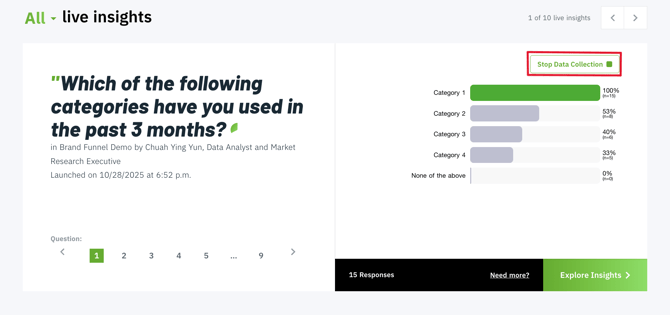
If you have a survey currently in the field, you will see it listed in your Live Insights view on the main dashboard.
-
Navigate to your Dashboard.
-
Locate the Live Insights section.
-
Find the survey you wish to end.
-
Click the Stop Data Collection button.
From the Survey Insights dashboard
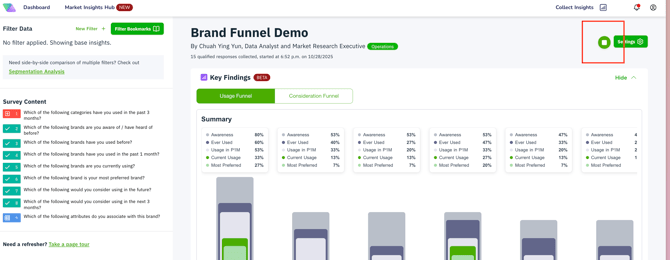
If you are already reviewing the real-time data for a specific survey, you can trigger the stop command from there.
-
Click into the Insights Dashboard of your ongoing survey.
-
In the top header or the control panel, click the Stop Collection button.
-
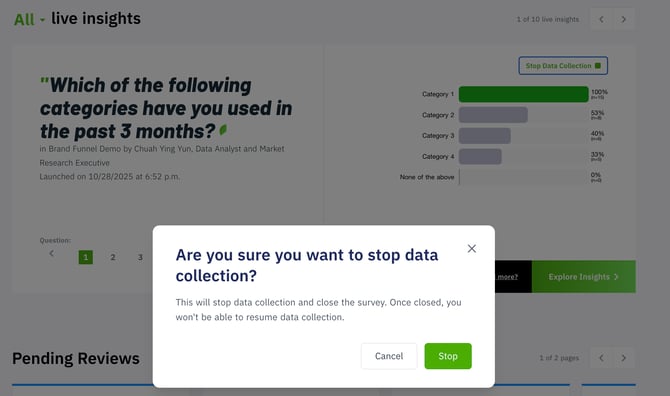
A confirmation prompt will appear.
Confirming the stop
Because this action is irreversible, a warning module will appear once you click the button.
-
Review the warning message: "Are you sure you want to stop data collection?"
-
If you are certain, click Stop.
-
The survey status will immediately update to Completed (or Manually Terminated), and the survey link will no longer accept new responses.